Cortendesk - Selfhosted Rust Desk
If you're self-hosting rust desk, you probably already know some of the trade-offs. The biggest one for me was the lack of a management portal for all devices, unless you want to pony-up to pay for Pro. I'm not above spending money where it makes sense, but to me I hoped to find a solution that provided for that portal experience without paying.
Enter Cortendesk
Prior versions just added Cortendesk on top of your existing installation, but since version 1.5, it's an entire drop-in solution for the Rust Desk server. That means that one docker image will run all you need to self-host rust desk and have a management console!
If you'd rather keep your own hbbs/hbbr, you still can: set CORTENDESK_ID_SERVER and CORTENDESK_RELAY_SERVER, and the bundled servers never start (upgrade guide). The console is built on Laravel and Livewire with no frontend build step. It's an independent project by Marc Pope and isn't affiliated with RustDesk or Purslane Ltd.
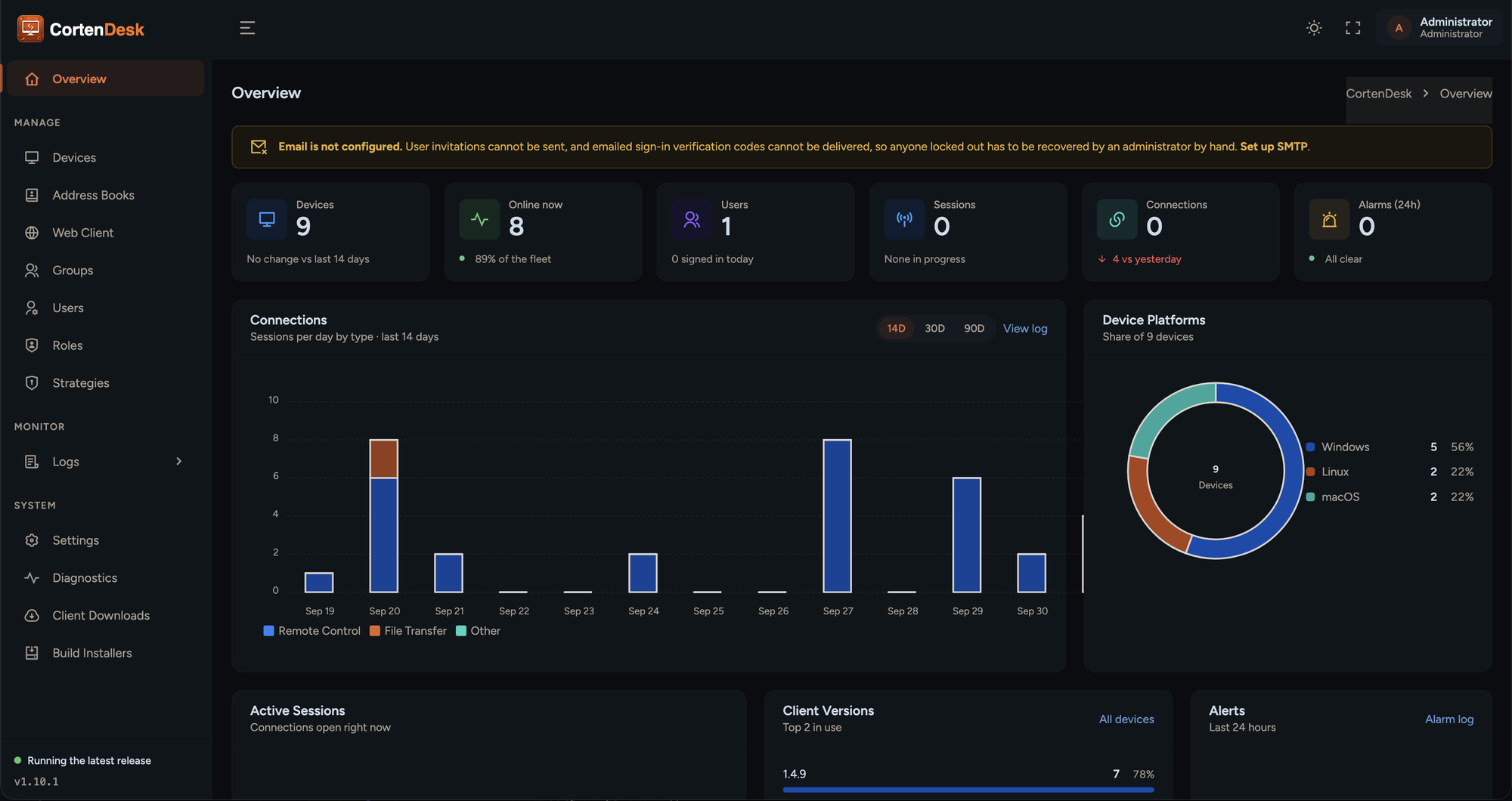
The console is super cool.
- Devices. A live fleet view with online presence, aliases, device groups, pre-registration, approval and a recycle bin. Since 1.8.0, each device has a detail page with hardware facts, notes and recent connections.
- Users and access scoping. Admins see everything; regular users see only their own devices plus groups granted to them. The same rules apply inside the RustDesk client, not just the web UI.
- Address books. Both the modern multi-book API and the legacy one, with shared books, share rules and colored tags.
- Audit logs. Connections, file transfers and console logins, filterable and exportable to CSV.
- Sign-in and automation. OIDC single sign-on, API tokens, email invitations and password reset.
- Client downloads. Upload your own custom client builds and publish them on a public download page.
- Dashboard. Live stats, active sessions, 14-day connection charts and platform/version breakdowns.
Here's the compose file that I run:
services:
  cortendesk:
    image: ghcr.io/marcpope/cortendesk:1.8.1   # pin a version
    container_name: cortendesk
    restart: unless-stopped
    ports:
      - "127.0.0.1:8000:8080"   # console, reached through the reverse proxy
      - "21115:21115"
      - "21116:21116"
      - "21116:21116/udp"
      - "21117:21117"
    environment:
      - APP_URL=https://rd.example.com   # the public URL your proxy serves
    volumes:
      - ./data/cortendesk:/data
It's important that I note that I run Pangolin reverse proxy, which handles the TLS certificates for the resource. If your proxy runs in Docker too (Pangolin's Newt, Traefik, Caddy), put both containers on a shared network and point the proxy at cortendesk:8080 instead of publishing the console port.
This setup is also using sqlite, which is perfectly fine for homelabs. If you're an MSP or larger provider using this resource, you may want to bump up to mySQL.
services:
  cortendesk:
    image: ghcr.io/marcpope/cortendesk
    ports:
      - "8080:8080"
    environment:
      APP_URL: https://console.example.com
      SESSION_SECURE_COOKIE: "true"

      DB_CONNECTION: mysql
      DB_HOST: db
      DB_DATABASE: cortendesk
      DB_USERNAME: cortendesk
      DB_PASSWORD: use-a-real-password

      CORTENDESK_ID_SERVER: hbbs.example.com:21116
      CORTENDESK_RELAY_SERVER: hbbs.example.com:21117
      CORTENDESK_PUBLIC_KEY: "<contents of id_ed25519.pub>"
    volumes:
      - cortendesk-data:/data
    depends_on:
      db:
        condition: service_healthy
    restart: unless-stopped

  db:
    image: mysql:8.4
    environment:
      MYSQL_DATABASE: cortendesk
      MYSQL_USER: cortendesk
      MYSQL_PASSWORD: use-a-real-password
      MYSQL_RANDOM_ROOT_PASSWORD: "1"
    volumes:
      - cortendesk-db:/var/lib/mysql
    healthcheck:
      test: ["CMD", "mysqladmin", "ping", "-h", "127.0.0.1"]
      interval: 5s
      timeout: 3s
      retries: 20
    restart: unless-stopped

volumes:
  cortendesk-data:
  cortendesk-db:
Final Thoughts
The free RustDesk server always did the hard part well and offered nothing on top. CortenDesk packages that server, a console for your fleet and a browser client into a single container on hardware you control. If you've been putting off a Pro subscription or living without a dashboard, it's worth an afternoon in a test container.